

Realme Debloater: Remove Android Bloatware Without Root Using ADB
Have you ever looked at the applications installed on your Android phone and wondered why some of them are even there?
Smartphone manufacturers customise Android with their own applications, services and background components. Some are useful, some are promotional, and others operate behind the scenes without much visibility to the user.
Realme devices are no exception.
While Android provides several ways to manage applications, removing unwanted preinstalled software is not always straightforward. Many system applications cannot simply be uninstalled through the normal Settings interface.
This is where Android Debug Bridge (ADB) becomes useful.
I started building realme-debloater, a Python-based command-line utility designed to inspect installed packages and carefully manage unwanted applications on Realme devices.
The idea isn't to remove as many applications as possible. It's to give users more control over what happens to their devices.
No root. No bootloader unlocking. No GUI.
Introducing realme-debloater
realme-debloater is a command-line utility built using Python and Android Debug Bridge.
It allows users to inspect installed Android packages, search for applications, review package information and manually manage removal operations.
The initial device profile is based on:
| Specification | Device |
|---|---|
| Device | Realme 8 5G |
| Model | RMX3241 |
| Android | Android 13 |
| Interface | Realme UI 4.0 |
| Programming language | Python |
| Android communication | ADB |
The tool can inspect other Android devices, but package behaviour varies depending on the model, firmware, region and Android version.
It doesn't require root permissions, an unlocked bootloader, custom recovery or additional Python libraries.
Why another Android debloating tool?
There are already plenty of Android debloating scripts available on GitHub.
Many focus on predefined package lists and offer options to remove multiple applications quickly. That can be convenient, but it also creates a problem: users may remove packages without understanding their purpose or dependencies.
An unfamiliar package name does not automatically mean that the package is unnecessary.
Some Android components support telephony, permissions, security, firmware updates and other essential functions.
I wanted to approach the problem differently.
Instead of automatically selecting applications for removal, realme-debloater follows a more deliberate workflow:
- Inspect installed packages.
- Identify the package that needs investigation.
- Research its purpose.
- Approve it manually.
- Preview the proposed operation.
- Confirm the exact package before applying removal.
The approval list starts empty. There are no packages automatically marked as safe to remove.
Features of realme-debloater
The project currently focuses on practical package-management operations.
- Device diagnostics: Check whether ADB is working and whether your phone is properly connected.
- Package inventory: Scan installed applications and save a timestamped inventory locally.
- Package listing: List installed packages and filter third-party applications.
- Package search: Find packages using a search term such as
heytap. - Package inspection: Inspect an individual package before deciding what to do with it.
- Manual package approval: Add individually researched packages to a local approval list.
- Dry-run removal: Preview a proposed removal without immediately modifying the device.
- Explicit confirmation: Require the exact package name before applying a removal.
- Restoration records: Record changes made through the tool and provide a command to attempt restoration.
How to debloat a Realme phone without root
The project uses ADB to communicate with the phone through USB debugging.
Requirements
You need:
- Windows, macOS or Linux.
- Python 3.9 or newer.
- Android SDK Platform Tools (ADB).
- A USB cable with data-transfer support.
- USB debugging enabled on your Realme phone.
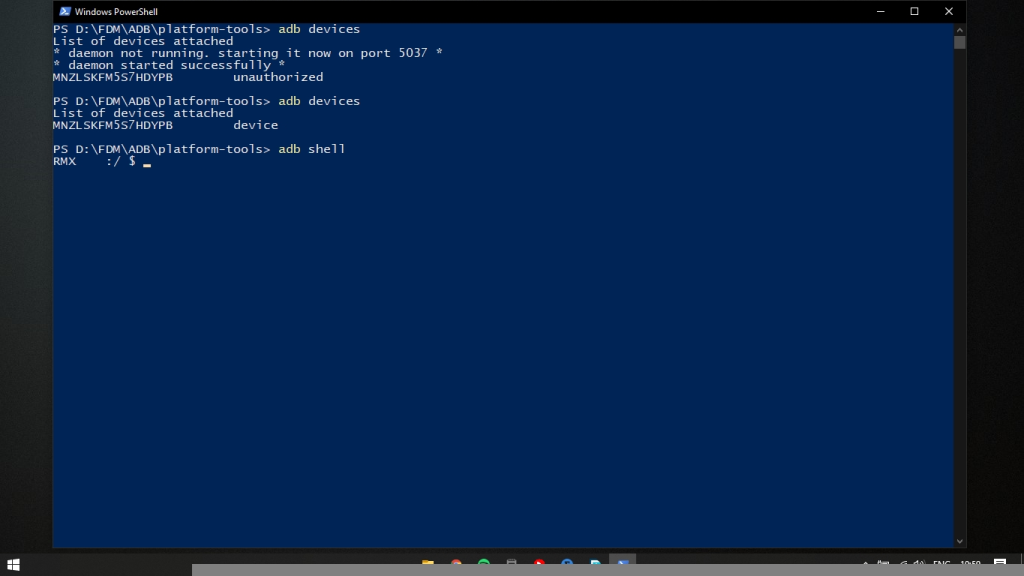
Step 1: Connect your phone
Enable Developer options and USB debugging on your Android device.
Connect it to your computer and authorise the USB debugging request.
Verify the connection:
adb devices
Your device should appear with the status device.
Step 2: Check the connection
Open a terminal inside the project directory.
Run:
python3 src/realme_debloater.py doctor
On Windows:
py src\realme_debloater.py doctor
This checks the ADB connection and displays basic device information.
Step 3: Scan installed packages
Run:
python3 src/realme_debloater.py scan
The tool creates a timestamped package inventory inside the state directory.
This is a read-only operation. It does not remove or disable applications.
Step 4: Search for an application
For example, to find packages containing heytap:
python3 src/realme_debloater.py search heytap
To inspect an individual package:
python3 src/realme_debloater.py info PACKAGE.NAME
Replace PACKAGE.NAME with the exact package identifier.
The inspection output is a starting point, not proof that a package is safe to remove.
A safety-first removal workflow
One of the main design decisions behind realme-debloater is separating package approval from package removal.
1. Approve a package
Only after researching and verifying that a package is optional should you run:
python3 src/realme_debloater.py approve PACKAGE.NAME \
  --reason "Verified optional"
The program asks you to type:
APPROVE
This adds the package to the local approval list. It does not uninstall anything.
2. Preview the removal
Run:
python3 src/realme_debloater.py remove PACKAGE.NAME
The default behaviour is a dry run.
The tool displays the proposed operation without changing the phone.
3. Apply the removal
After reviewing the operation, run:
python3 src/realme_debloater.py remove PACKAGE.NAME --apply
The program asks you to type the exact package name again.
This additional confirmation is intended to prevent accidental removal.
What does removing an Android package actually do?
The project uses Android's package-management command:
pm uninstall --user 0 PACKAGE.NAME
The --user 0 argument targets Android's primary user.
This is an important distinction.
The operation removes the application for that user, but does not erase its system image from the firmware partition. It is not equivalent to permanently deleting the system component.
Can removed applications be restored?
The project records changes in state/changes.json.
To preview restoration:
python3 src/realme_debloater.py restore PACKAGE.NAME
To apply restoration:
python3 src/realme_debloater.py restore PACKAGE.NAME --apply
Restoration uses Android's:
cmd package install-existing
This may make a preinstalled application available again for the user, but it does not necessarily recover its previous application data, preferences or updates.
Restoration is useful, but it should not be mistaken for a complete backup.
Case Study: Investigating CrashBox on Realme UI
While examining the installed packages and background activity on my Realme device, I came across an interesting OEM component:
Package: com.oplus.crashbox
Application: CrashBox
Location: /system_ext/app/CrashBox/CrashBox.apk
Rather than immediately adding it to a debloating list, I decided to investigate its actual runtime behaviour using Android's diagnostic tools.
This is a good example of why package names alone are not enough to determine whether an application should be removed.
1. Identifying the running service
I inspected the package using:
adb shell dumpsys activity services com.oplus.crashbox
The output identified an active service:
com.oplus.crashbox/.CrashMonitorService
The package was running under UID 1000 and used the OEM-specific permission:
oplus.permission.OPLUS_COMPONENT_SAFE
The diagnostic output also identified its installation directory:
/system_ext/app/CrashBox/CrashBox.apk
This indicates that CrashBox is integrated into the system extension partition rather than being an ordinary downloaded application.
2. Background activity
I examined battery statistics:
adb shell dumpsys batterystats --charged
The captured output included:
| Metric | Observed value |
|---|---|
| Process CPU user time | 30 ms |
| Process CPU kernel time | 40 ms |
| Process starts | 20 |
| CrashMonitorService starts | 4 |
| Service launches | 18 |
| WorkManager job execution | Approximately 1.54 seconds |
| Recorded job executions | 3 |
The output also contained a scheduled job associated with:
androidx.work.impl.background.systemjob.SystemJobService
3. Scheduled network-capable work
I also inspected JobScheduler:
adb shell dumpsys jobscheduler
The captured output showed periodic jobs belonging to com.oplus.crashbox.
One of the jobs included an Internet network requirement.
That is an important observation, but it needs to be interpreted carefully.
A network requirement establishes that the scheduled job can run when the required network conditions are met. It does not prove that the application uploads personal information, crash reports or any particular data.
4. What can we conclude?
The service name CrashMonitorService strongly suggests a crash-monitoring or diagnostic purpose.
The available evidence supports these observations:
- CrashBox is installed as an OEM system component.
- It has an active crash-monitoring service.
- It registers scheduled background work.
- At least one observed scheduled job has a network requirement.
- The captured CPU usage was relatively small.
However, the available ADB output does not establish exactly what information CrashBox collects, whether it transmits diagnostic reports, which servers it communicates with or how long any collected data is retained.
To answer those questions, further investigation would require the exact APK manifest, application code and controlled network analysis.
My preliminary assessment: CrashBox is an OEM diagnostic/crash-monitoring component with scheduled background activity. Its data-collection behaviour remains unverified.
I would not label it spyware based on these observations, and I would not automatically classify it as safe to remove.
This is precisely why I prefer inspecting packages before adding them to a debloating list.
What should you avoid removing?
Not everything that looks unnecessary is bloatware.
Some packages are deeply integrated into Android and the manufacturer's software environment.
Avoid experimenting with packages responsible for:
- Android System UI and Settings.
- Telephony and mobile network services.
- Permission management and package installation.
- Google Play services.
- Device security.
- OEM firmware updates and OTA functionality.
- Device-specific system frameworks.
The initial RMX3241 inventory includes protected update-related components such as:
com.oplus.ota
com.oplus.sau
com.oplus.sauhelper
com.oplus.romupdate
com.oplus.cota
Their presence does not mean an OTA update file is consuming storage.
Package behaviour can vary between firmware versions, so a package that was removable on one Realme device should not automatically be considered safe on another.
Does Android debloating improve privacy and performance?
Debloating can reduce the number of applications available to an Android user, but the benefits depend on what is removed and how that component behaves.
Removing an application does not automatically guarantee:
- Better battery life.
- Faster performance.
- More available storage.
- Complete removal of telemetry.
- Protection against network tracking.
realme-debloater is a package-management utility, not a firewall, network monitor or comprehensive Android privacy-hardening system.
I would rather make a limited, verifiable claim than promise a magical performance improvement from removing a few packages.
Project limitations
The initial target is Realme 8 5G (RMX3241), Android 13 and Realme UI 4.0.
Other devices can be inspected, but their package behaviour may differ.
The tool also does not automatically determine whether every package is safe to remove. That decision requires research and device-specific verification.
It uses user-level package uninstallation rather than permanently deleting system applications from the firmware partition.
Users should back up important information before applying package changes.
Final thoughts
The Android ecosystem gives manufacturers considerable control over the software shipped with smartphones. Users should have meaningful ways to understand and manage that software too.
With realme-debloater, I wanted to explore a more transparent approach to Android debloating: inspect what is installed, understand the package, preview the operation and only then decide whether to proceed.
The CrashBox investigation is a small example of that philosophy. Instead of assuming that an unfamiliar OEM package is unnecessary, I examined its services, process activity and scheduled jobs. The result was a more informed assessment, not an unsupported accusation or an automatic removal recommendation.
The goal isn't to remove everything.
It's to understand what is running on your device and make informed decisions about it.
Inspect first. Approve manually. Remove deliberately.
Get the project
GitHub: Lumacodes/Realme-Debloater
Explore the source code, read the setup instructions and contribute to the project.
Frequently asked questions
Can I remove Realme bloatware without root?
Yes. realme-debloater uses ADB to manage certain applications for Android's primary user. Root access and bootloader unlocking are not required.
Does realme-debloater support Realme 8 5G?
Its initial device profile targets the Realme 8 5G (RMX3241) running Android 13 and Realme UI 4.0. Other devices can be inspected, but compatibility and package behaviour are not guaranteed.
Is ADB debloating safe?
ADB debloating can be performed without root, but removing the wrong system package can still disrupt phone functionality. The project uses manual approval, dry-run previews and explicit confirmation to reduce accidental changes.
Does pm uninstall --user 0 delete an application permanently?
No. It removes the application for the specified Android user. The application may remain in the firmware's system partition.
Can I restore a removed Realme system app?
The project provides a restoration command using Android's cmd package install-existing. It may restore the preinstalled application but does not necessarily recover previous app data or settings.
What is CrashBox (com.oplus.crashbox)?
CrashBox is an OEM system component whose observed service is named CrashMonitorService. ADB logs from the investigated device show scheduled background work and a network-capable job.
Where can I download realme-debloater?
The project is available on GitHub.
About the author
- A software engineer who creates random things
Comments
Join the discussionNo comments yet. Be the first to comment.
